

Kit user questions #1: Scoped variables

February 11th, 2026
Today we got a question from kit user Taylor Wright. He wrote this:
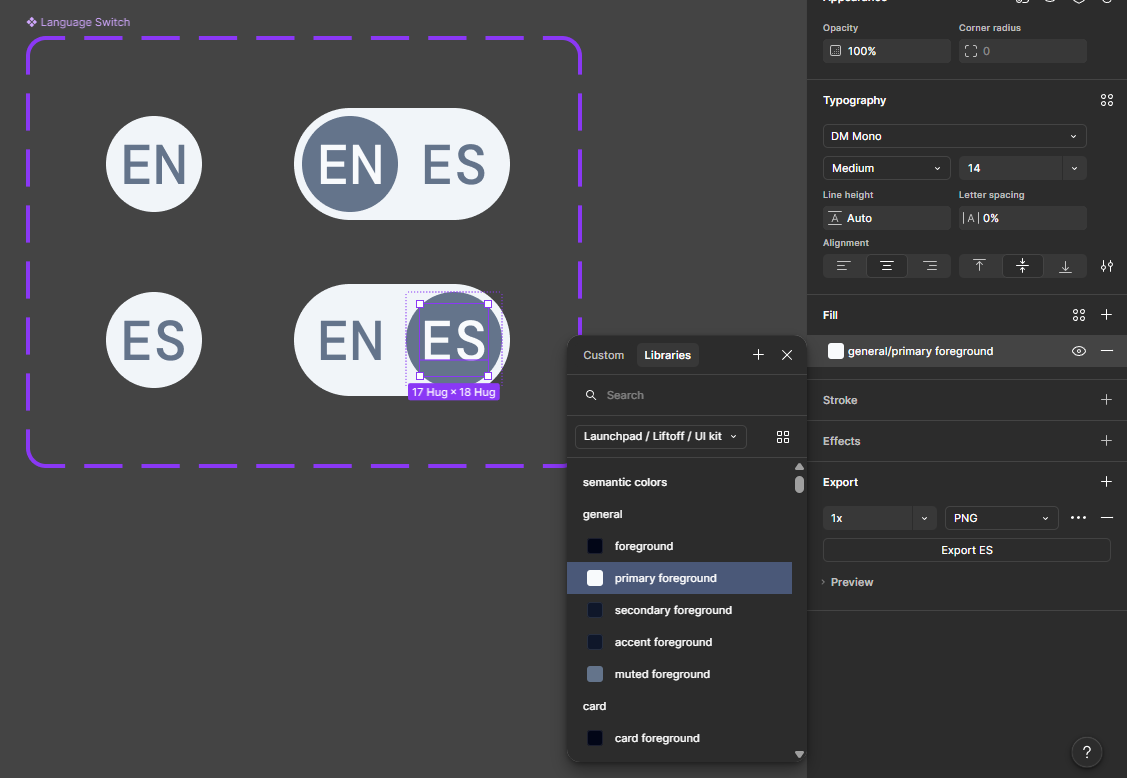
I've been using your Shadcn UI Kit in Figma, which has been a big help. I'm approaching the point where I'll be working with frontend developers so I'm hoping that all goes well.Yesterday I was making a custom component for a language toggle (I wanted to do something different from the standard “Switch” component).
One issue I ran into was trying to set the selected text to “general/muted” so it would match the color of the background pill shape (which is “general/muted”).
I can’t tell why I have access to certain colors when some items are selected, but not all the time. Looking at the UI Kit’s Colors page (link), it sounds like there’s some logic for foreground and background colors, but I couldn’t quite understand.
Do you explain this further elsewhere? I’m not even sure how this is enabled in Figma.
I’ve found a temporary workaround, but was hoping there might be something clever that I’ve missed.
Here’s our reply.
Hi Taylor,Thanks for your detailed question.
This is due to color scoping, some colors are scoped to certain scopes, but sometimes that is actually in the way of work.
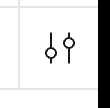
You can go into the variables panel. Hit the little settings icon on hover, and change the scope in the 2nd tab of a variable to work around this.
There is no specific mention of color scoping in the docs, we should probably explain this.
- muted is meant for backgrounds and is set to Frame and Shape (this is actually muted background but shadcn/ui omits the word background as a pattern in their naming)
- muted foreground is meant for foregrounds and is set to Shape, Text and Effects.
So in your case, you are trying to use a background color for a foreground color.
The reason to scope variables is that less variables show up when assigning (e.g. only font sizes show up when applying font size as a property). This is a way to make it more manageable.
Presumably - but this would have to be tested - it gives LLMs also an extra data point of how to use a color. But I am pretty certain this info is not used that much when using for example Figma MCP.
I’ve found that it’s not that helpful to apply the scoping for all purposes, since for example, we use rectangles that you can toggle on and off as borders in our table component; so this is technically a fill on a frame; and not a border.
If you would set color scope to stroke only (which seems natural for borders) you wouldn’t be able to access it.
We received permission from Taylor to share his question for the benefit of the community.
We are sure other people are wondering about this.
If you have any shadcn/ui kit questions, feel free to e-mail us at [email protected]. Perhaps we can turn this into a series of blog posts?